
On October 29, Canva unveiled Canva Brush, its first vision-language model built specifically to edit existing graphic projects. Unlike Canva Craft, announced one week earlier, Brush doesn't generate images from scratch. It reads a live design, understands its structure. Intervenes on text, images, colors, layout, or entire page sequences. To do this, it uses an agent that writes and executes code, checks the result on the page. Decides whether to act again. Brush is available immediately for Canva Pro subscribers inside Canva AI.
The figures below are Canva's own claims and have not been independently verified by third parties. We're drawing on the Is It SOTA model tracker, Small Business Trends' October 30 article, and TechCrunch for coverage of Canva Craft. Canva's press release was not sent to us directly.
Introducing Brush: Our first vision-language model for design. 🖌️
— Canva (@canva) October 29, 2026
Brush sees your design's layout, layers and vibe the way you do, and edits alongside you. Fix one line of text, restyle a whole deck or build from a blank page.
See what Brush can do 👇 pic.twitter.com/RHKmlxZkmA
What Brush Actually Does
According to the Is It SOTA model card, which cites Canva's announcement, Brush was developed by Canva Research, the company's internal AI lab. Canva describes it as a model that sees a design's layout, layers, and overall aesthetic the way a human designer would, then edits alongside the user. The underlying architecture starts from an unnamed open-weight model, which Canva then trained on design and editing tasks and refined with large-scale reinforcement learning using a design-specific evaluation system.
The workflow is that of an agent. Brush writes and runs code to modify project elements, then inspects the page output to determine its next move. Elements produced this way remain editable inside Canva's regular editor, so a user can take over at any point. That's the key difference from an image generator: the result isn't a flat image to rebuild, but a live project file you can keep correcting.
What Brush Can Do From October 29
According to Small Business Trends, Brush can operate on a single line of text or across an entire multi-page presentation in one pass. Reported use cases include customizing social media graphics, pitch decks, and promotional materials; applying changes to every page of a document simultaneously; and adapting a design to a different format (for instance, turning a slide into an Instagram post). Users start from an existing design and can alternate between the agent's edits and their own manual adjustments.
For now, Brush handles only a subset of supported operations and only for Canva Pro subscribers, who access it through Canva AI. Broader availability is listed as “coming soon” with no release date attached. There is no developer API, no public model card, and no downloadable weights. This makes Brush quite different from general-purpose computer-use agents that operate autonomously across a full desktop environment.
The Numbers: Speed and Cost, As Claimed by Canva
Canva claims Brush is up to 69% faster than its previous design agent on general editing tasks, with a per-operation cost that is 46% lower. In internal tests, also according to Canva, Brush matched or exceeded the previous system's quality on the majority of tasks. The company has not published its test protocol, the task sample used, the absolute cost figures, or any comparisons against third-party models.
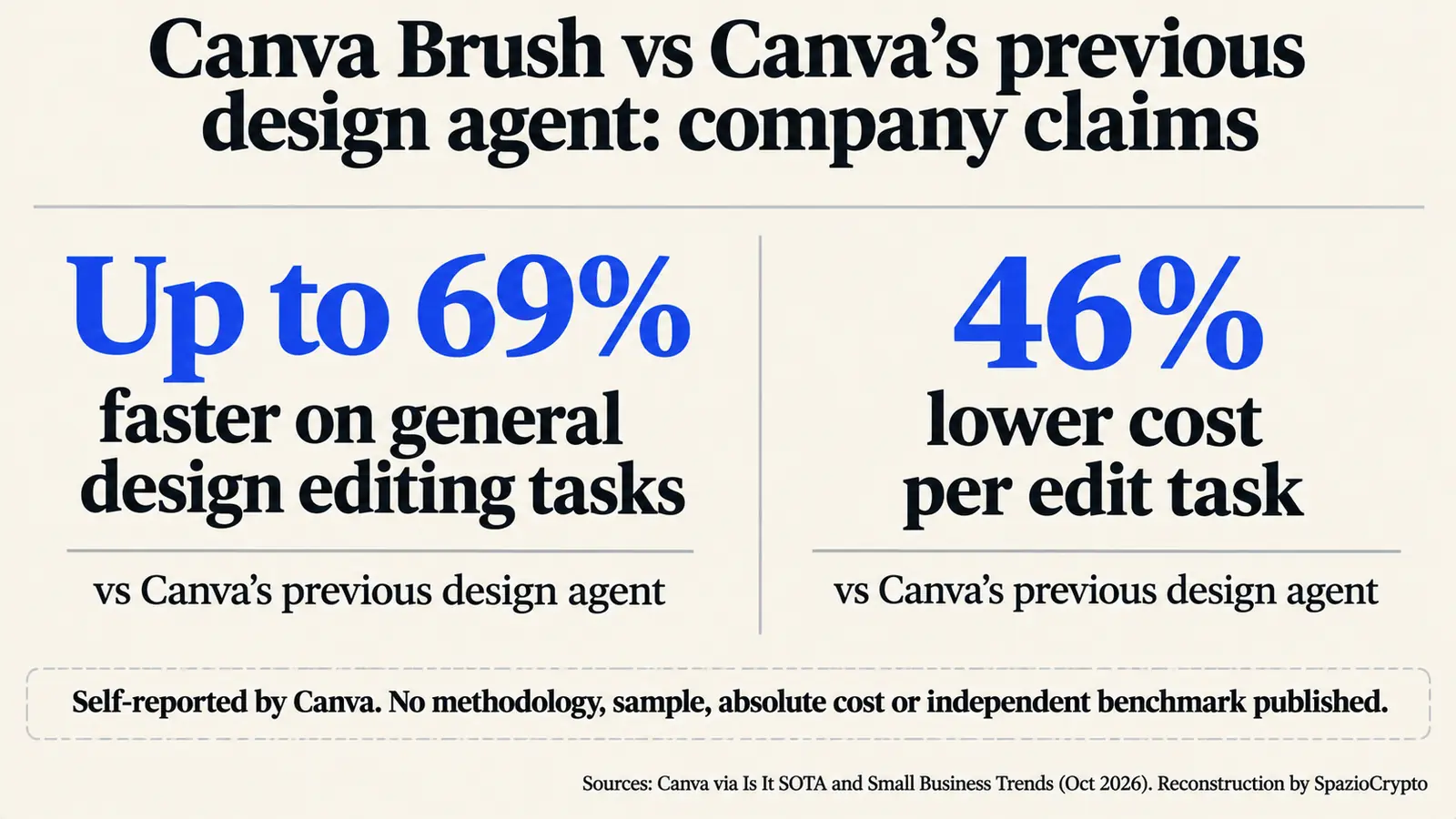
Is It SOTA, which ranks models only on the basis of independent evaluations, currently lists Brush as “awaiting benchmarks.” Without a public API or downloadable weights, no external leaderboard can test it. The cost reduction claim does carry clear strategic logic, though. According to TechCrunch, Canva previously relied on multiple third-party models for image tasks. Developing proprietary models in-house should cut its external API spending substantially.
The Strategy: Generate and Edit, Two Separate Tools
Brush completes a two-part design announced over consecutive weeks. On October 22, as reported by TechCrunch, Canva unveiled Craft, its first image generation model. Craft was trained on graphic templates made by humans rather than photographs and can produce images up to 2K resolution across roughly 30 formats. Craft is available to all users in Dream Lab and through Canva's API. One week later came Brush, which works downstream on projects that already exist.
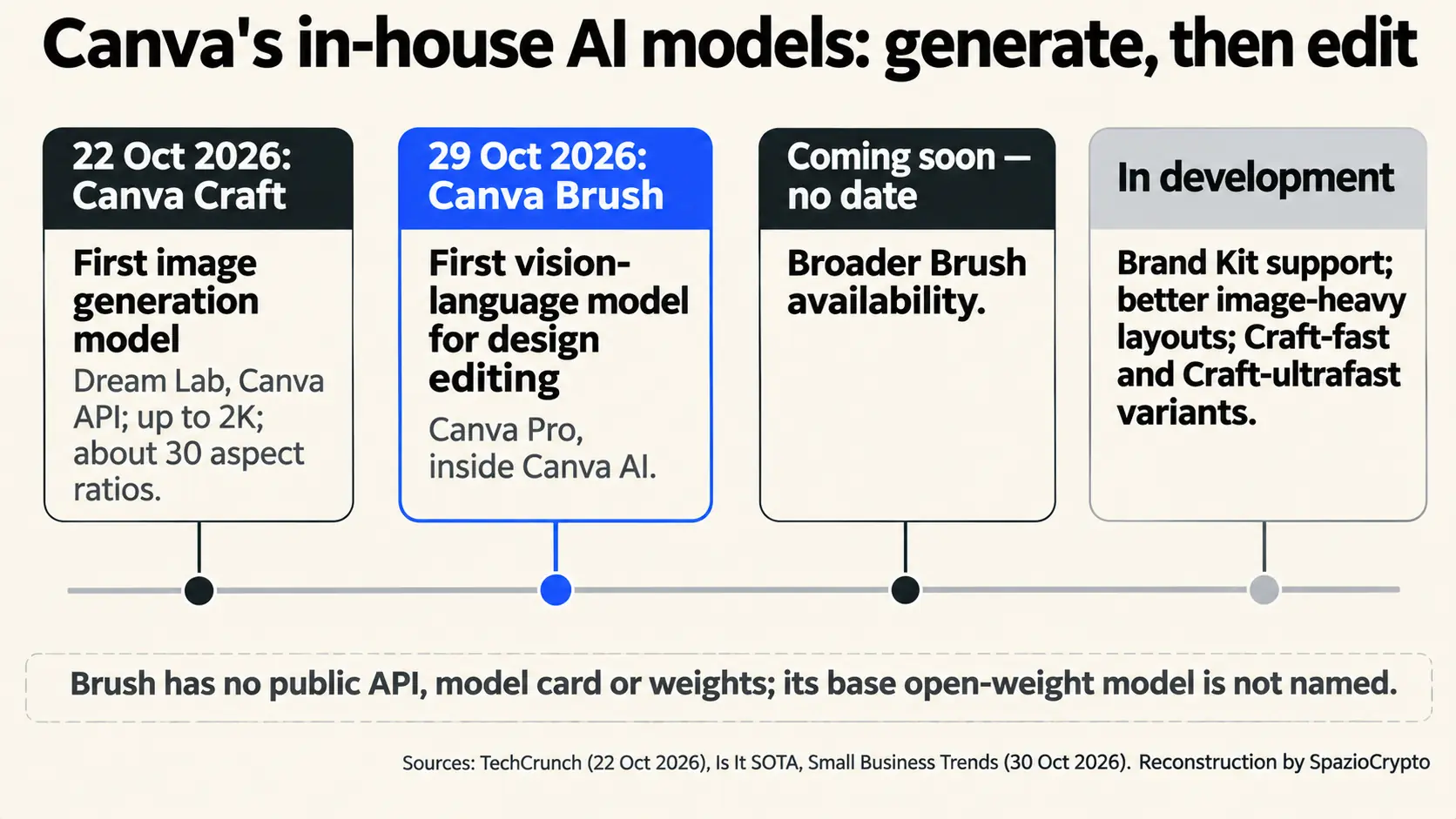
Our read is that Canva is deliberately splitting creative production between a model that generates and a specialized agent that edits, checks, and repeats operations. The competitive game shifts from the quality of a single image to the ability to revise an entire campaign without rebuilding it. The same pattern is visible across the broader AI space, from Adobe and NVIDIA with creator-focused AI tools to Google DeepMind with the interactive worlds of Genie 4.
The Limits: What's Still Missing
Several documented gaps stand out. The base open-weight model is not named, so its provenance can't be verified. There's no public technical sheet, no weights, and no dedicated API. Brand Kit support (maintaining a company's visual identity guidelines) and improved handling of image-heavy layouts are still in development, according to Small Business Trends. Attachment-based references are also listed among incoming features. The same article recommends that businesses manually verify that Brush outputs match their brand's tone and visual style.
There's also an agency question. An agent that writes code and modifies dozens of pages autonomously creates a real need to know what changed and to be able to roll back. Canva states that elements remain editable, but the company has not publicly described a change log for agent actions. This boundary problem is the same one that has surfaced in other products, including enterprise agents from Google and Anthropic and their permission frameworks.
What This Means for European and UK Users
The sources reviewed don't indicate geographic restrictions for Brush beyond the Pro subscription requirement. For European freelancers, small businesses, and marketing teams who rely on Canva for social content, presentations, and promotional materials, the practical upside is adapting a campaign across multiple formats in a few steps. The constraint remains the same: without Brand Kit support, visual identity control falls entirely on whoever reviews the final output.
There's a regulatory dimension worth noting here, particularly for EU users. The EU AI Act imposes transparency obligations for content generated or substantially manipulated by AI systems in certain contexts. Teams publishing content on behalf of a company need to track how much of the work an agent performed. The case of the Nikon-awarded video later disqualified over AI use shows that disclosure matters, both inside and outside formal legal requirements.
Canva Brush in Brief
What is confirmed, what isn't
- Confirmed: announced October 29; Canva's first vision-language model for editing designs; agent writes and executes code and checks results; available for Canva Pro subscribers inside Canva AI for a subset of operations.
- Not disclosed: the base open-weight model; a public technical sheet, weights, or API; the methodology behind the claimed 69% speed and 46% cost reductions; a release date for broader availability.
- To watch: Brand Kit support arriving; extension to non-Pro users; any independent benchmarks or a developer API opening up.
The Bigger Picture
Our editorial read, stated as such: with Craft and Brush, Canva is building both halves of the creative production stack in-house, covering generation and editing while reducing its dependence on third-party models. For users, the more meaningful shift is Brush, an agent working inside the project file rather than alongside it. The same architecture (a model that creates and an agent that checks and iterates) is spreading across the AI product landscape, as Claude Duet from Anthropic illustrates. Value is migrating from the quality of a single output to the capacity to correct without starting over.
Three signals are worth tracking going forward. First, Brand Kit support: without it, companies with precise visual identities will need to review every agent-generated change manually. Second, the timeline for broader availability, which will show whether Brush stays a Pro-tier feature or becomes the default editing mode in Canva. Third, the opening to external benchmarks, the only way to test whether Canva's internal performance figures hold up outside the company's own test environment.