


VEED launched its AI video editing agent on November 19, 2026, a tool that assembles social-ready video from three different starting points: footage you already own, the URL of a product page, or a written prompt describing an idea. The agent cuts clips, adds multilingual subtitles, titles, logos, and end cards, and generates images when source material is missing. VEED AI is available on web, iOS, and Android, with a free plan that exports without watermarks. The real question isn't whether the first output looks decent. It's how much work you still have to do afterward.
This article draws on VEED's official press release, the November 19 changelog entry, and the technical guide published by the company. VEED's official post on X was published on November 19 at 14:10 UTC, but its text was not accessible to our tools at the time of writing. All capabilities described below are VEED's own claims. No independent benchmarks exist yet.
What VEED AI Actually Does
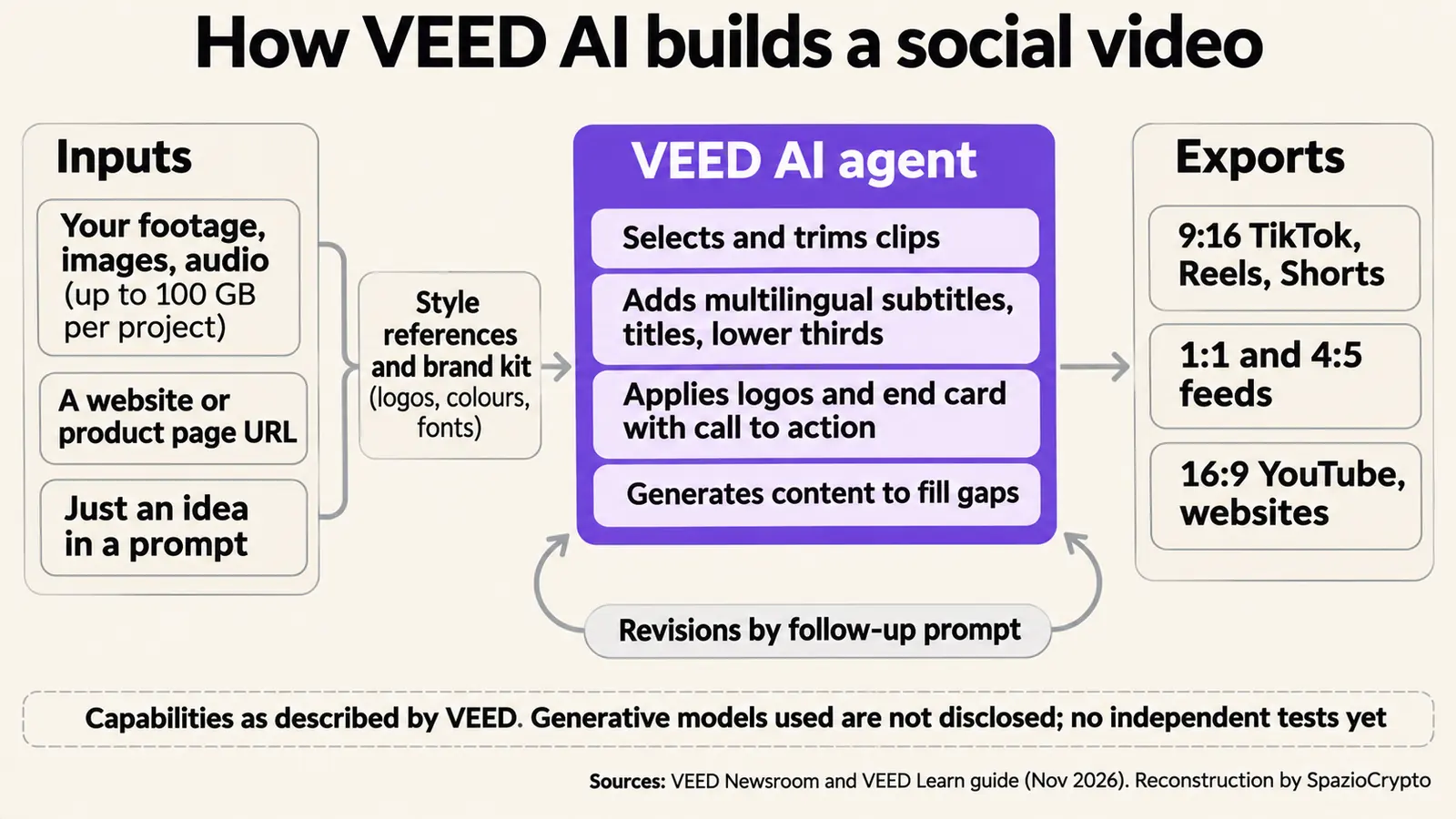
According to VEED's guide, the workflow runs in seven steps. You open VEED AI in a browser or the mobile app, then upload video, image, or audio files. Alternatively, you paste the URL of a website or product page. You can add reference images or video clips to guide the visual style, and a brand kit containing logos, colors, and fonts. Then you write a prompt specifying the goal, platform, desired length, tone, and any required elements. The agent assembles the edit from there.
The operations VEED lists are the standard building blocks of social video: fast-paced cuts, subtitles and captions, titles and lower-thirds (the text overlays at the bottom of the frame), logos, and end cards with a call to action. Corrections are requested through additional prompts, in plain language. The finished project can be exported in multiple aspect ratios simultaneously: 9:16 for TikTok, Reels, and Shorts; 1:1 and 4:5 for feed posts; 16:9 for YouTube and websites.
Where Can a Video Start?
The variety of input types is the most interesting part. The first option is your own footage, with a maximum project size of 100 GB and support for formats ranging from MP4 to ProRes files. The second is a web page URL: VEED pitches this as a base for a product announcement, pulling text and images directly from the page. The third is a plain idea, from which the agent builds a video using generative content.
That third option carries the most significant caveat. VEED does not disclose which generative models it uses or what proportion of the final output may consist of images created from scratch. For an individual creator, that's a minor detail. For a brand that needs to demonstrate what a product actually looks like, or for a newsroom, it's a transparency question that matters. The video disqualified from the Nikon competition because it was generated with AI illustrates exactly how much it matters to know what was filmed and what was fabricated.
How Is This Different From a Video Generator?
Generative tools have already driven down the cost of producing a single clip. VEED is trying to automate the less glamorous and more time-consuming part of the job: turning raw material into content that's ready to publish. A generator produces a clip. An editing agent has to read source material, decide what to keep, build a rhythm, apply brand identity, and prepare multiple versions for different platforms.
That's the same trajectory visible in the creator tools coming from Adobe and Nvidia, and, in a different register, in world-building models like Google DeepMind's Genie 4. VEED wasn't new to AI assistants before this launch. Its blog had already introduced an “AI Agent” inside the editor capable of adding subtitles, music, and cuts on command. The difference is that VEED AI steps in before the editing starts, not during it.
Who Is Behind VEED?
VEED was founded on March 20, 2018, by designer Sabba Keynejad (now CEO) and engineer Tim Mamedov (now CTO). According to the company's about page, the team has grown past 150 people and the platform serves “millions” of users, without a precise figure. Sequoia is listed among the investors, with a $35 million round in 2022, as reported by VEED's own communications. In its press release, VEED describes the new product as “the number one AI video editing agent”, a self-designation it doesn't back with any comparative data.
How to Actually Test Whether It Works
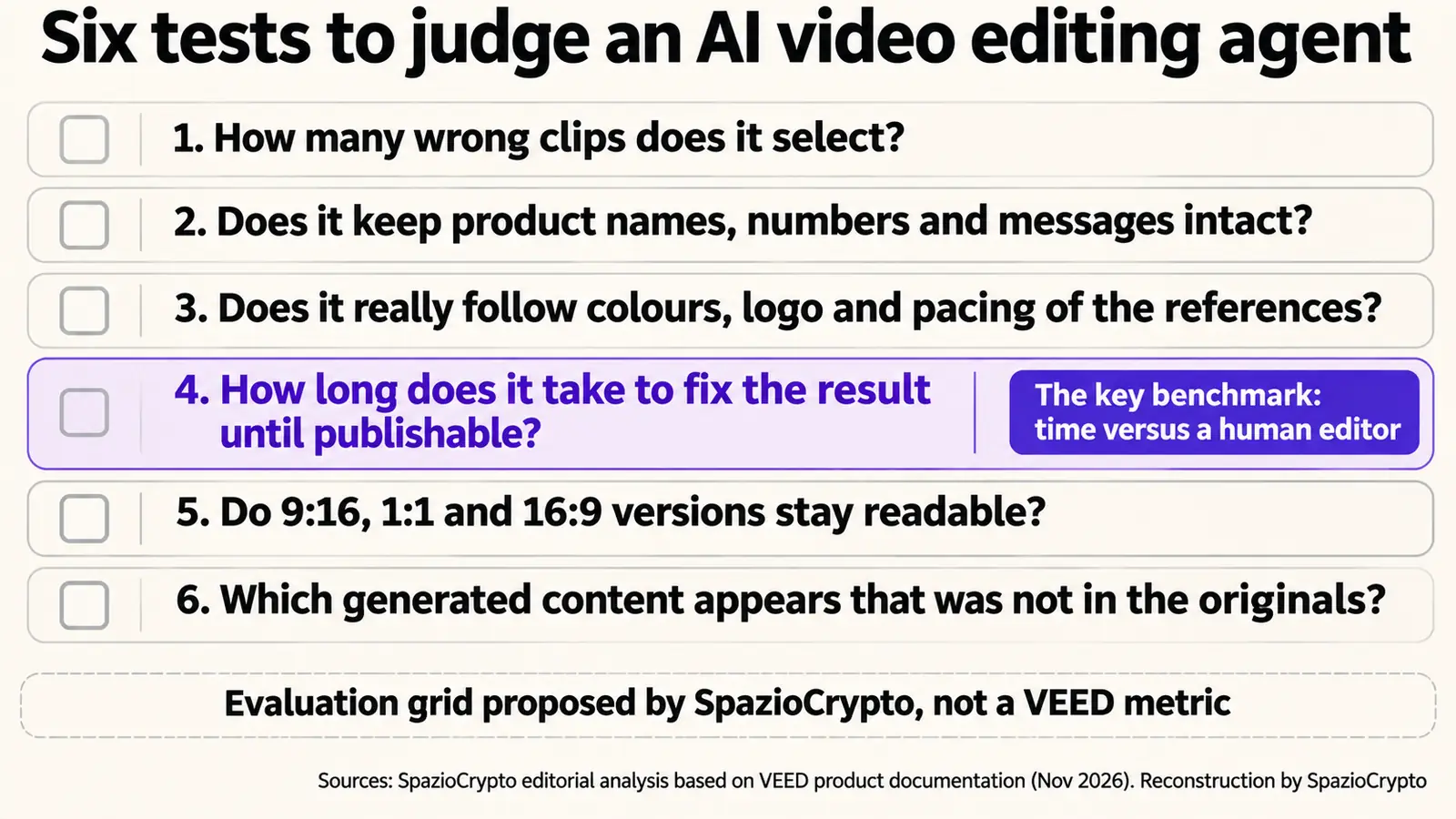
VEED publishes no comparisons with human editors or competing software, and no data on the percentage of projects that are publishable without manual intervention. With that in mind, here is a six-point testing framework. This is our own editorial checklist, not a criterion from the company.
First, how many wrong clips does the agent select. Second, whether it preserves product names, numbers, and messages without altering them. Third, whether it genuinely respects the colors, logo, and rhythm of the reference material. Fourth, how long it takes to correct the output until it's publishable. Fifth, whether the 9:16, 1:1, and 16:9 versions remain legible, with subtitles and text overlays in the right position. Sixth, what generative content gets inserted that wasn't present in the source material.
The useful comparison isn't against a company demo. It's against the time a human editor would need to reach the same result. That's the same standard that applies to AI agents broadly, from enterprise agent permissions to the cost of agents that operate computers: what counts is how much human labor they actually eliminate, not how autonomous they appear.
VEED AI at a Glance
What is confirmed, and what isn't
- Confirmed: launched November 19, three input types, fast cuts, multilingual subtitles, titles, brand kit and end cards, prompt-based revisions, multi-format export, web, iOS, and Android, free plan without watermarks.
- Not disclosed: which generative models are used, the full limits of the free plan beyond 100 GB per project, pricing for paid plans, and any quality benchmarks for the editing output.
- To watch: first independent tests, brand consistency after multiple revision rounds, and transparency around generated versus original content.
What This Means for Content Creators
Our reading, stated as such, is that VEED's real promise isn't “generate video.” It's removing the timeline from the workflow of people who publish every day. For a small e-commerce brand or a creator living off short-form content, the bottleneck isn't the idea. It's editing time. If the agent cuts an hour of work down to ten minutes of corrections, the value is real even with an imperfect result.
The risk runs in the opposite direction. The more editing is automated, the easier it becomes to publish content that nobody has genuinely reviewed, with generated images mixed into real footage. As with every agent that acts on a user's behalf (a question that cybersecurity authorities are actively working through), the question isn't only what the machine can do. It's who remains responsible for the result. Three signals are worth watching: independent tests, whether VEED introduces content labeling for generated material, and where the real limits of the free plan actually sit.
Sources
Announcement: VEED Newsroom, “VEED Launches VEED AI, an AI Video Editing Agent”, November 19, 2026. Release: VEED Changelog, entry of November 19, 2026. How it works: VEED Learn, “Create Videos with VEED AI Video Editing Agent”, James Berry. Company: VEED, About. Previous agent: VEED Blog, “Introducing AI Agent by VEED”. Official post: VEED on X, November 19, 2026 (text not read). Not read: VEED Newsroom, “VEED AI: From prompt to social video, now live for everyone”.